
Space Launch Schedule
Kickstand Technology IncEvents
4.2143.00 Reviews
- Version
- 8.2.1
- Installs
- 100.00K
- Age Rating
- Everyone
Screenshots
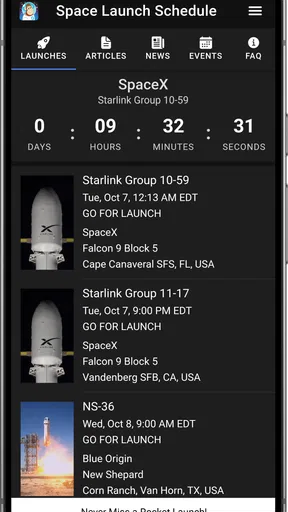
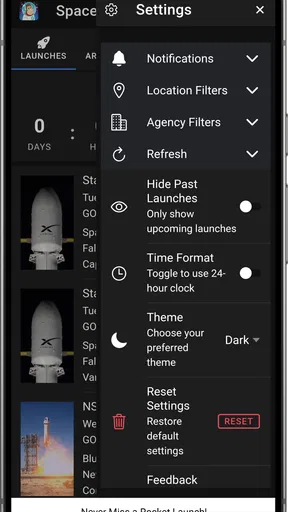
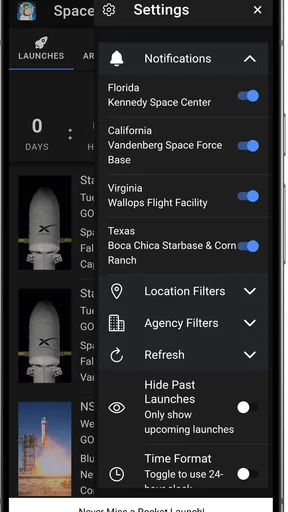
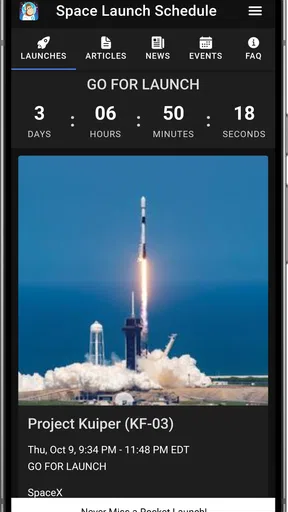
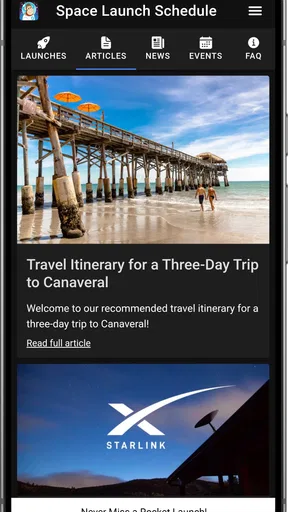
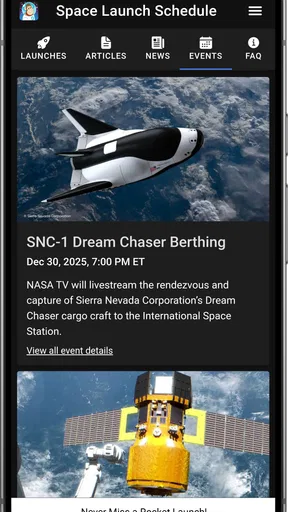
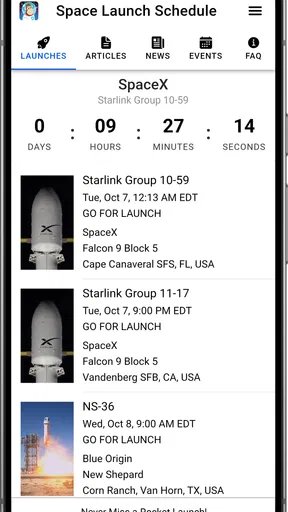
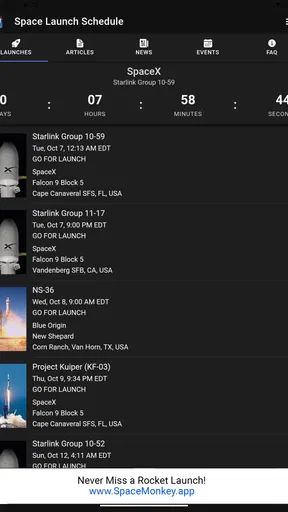
Our Review of Space Launch Schedule
 Analysis by Appyee
I installed Space Launch Schedule because rocket launches are easy to miss when they are spread across different space agencies, launch sites, and time zones. This app takes a focused approach: it is an events app built around upcoming spaceflight activity, with the practical goal of helping me see when and where launches are expected to happen. I found that narrow purpose more useful than a general news feed when I simply wanted to check the next launch rather than read a long article.
Created by Kickstand Technology Inc, it is free to use and has reached over one hundred thousand installs. Its average rating sits at 4.2 from roughly four hundred ratings, which feels consistent with my experience: the app is straightforward and genuinely handy for people who follow launches, although it is not designed to replace detailed mission reporting or a full space-news service.
How it works in a shared household
The most natural way to use Space Launch Schedule at home is as a shared reference point. One person might notice that a launch is coming up, another might want to know whether it can be watched from a particular area, and someone else may simply enjoy checking the next mission with a child. Because the app is centered on a calendar-like stream of launch events, it works well as a quick conversation starter on a shared phone or tablet.
I can imagine opening it during breakfast, checking the next few entries, and telling the household that a launch is planned later in the day. That is more convenient than searching the web from scratch, especially when nobody remembers the mission name or the launch provider. It also gives a family an easy way to build a small routine around space activity without turning the experience into a complicated hobby.
The important distinction is that this is a viewing and planning tool, not a household organizer. I would not treat an event shown in the app as a guaranteed appointment. Launch schedules can move, and a listed time is best understood as something to monitor rather than a promise that everyone should plan their evening around. If my family wanted to watch together, I would use the app to identify the event, then double-check the latest official announcement before making firm plans.
That simple two-step habit is one of the best ways to get value from it. Use the app for discovery and orientation, then confirm the final status elsewhere when timing matters. This keeps the app useful without expecting it to provide the depth or authority of a mission operator’s live updates.
What makes it useful on one device
On a shared device, the app’s focused subject matter is an advantage. A child can explore upcoming launches without being dropped into a broad social feed, while an adult can quickly inspect the schedule without sorting through unrelated headlines. The experience is also easy to explain: open the app, browse the events, and select the launch that interests you.
There is a subtle benefit here for households with different levels of interest. The space enthusiast can use the schedule as a starting point for further research, while a casual user can glance at the next event and close the app without learning a complex interface. I prefer that flexibility to a news-heavy alternative that assumes I want background stories every time I open it.
Still, shared use has limits. The app should not be mistaken for a family calendar, a messaging tool, or a coordinated viewing platform. It helps people look at the same information, but it does not replace a conversation about who is watching, which time zone applies, or whether the event has changed. That boundary is important when several people are relying on one schedule.
Setting it up without blurring account boundaries
My advice is to begin with a short trial rather than immediately making it part of a household routine. Open the schedule, inspect several entries, and see whether the presentation matches the way your household follows launches. Some people want only the next event; others enjoy browsing a wider list and researching each mission separately. The app is better suited to the second group than to someone looking for a single reminder and nothing else.
Because this is a specialized events app, I would keep its role clearly defined on a shared device. It is for checking launch activity, not for storing family plans or acting as a private account hub. If different people use the same phone, it helps to say out loud what the app is being used for. That sounds obvious, but it prevents a schedule check from being confused with a confirmed household commitment.
The current version is 8.2.1, and the app supports devices running Android 6.0 or later. That gives it a fairly broad reach among older Android phones and tablets, although the actual comfort of use will depend on the screen and the device’s general condition. A larger tablet display is more pleasant for showing the schedule to several people, while a phone is better for quick checks when someone asks, “When is the next launch?”
I would also avoid setting expectations around exact timing until the household has learned how the app fits into its routine. A launch schedule is inherently changeable. If a child is excited about watching a launch, explain that the listed time can shift and that the family may need to check again. This is not a flaw unique to the app; it is part of following real launches. The app makes the schedule easier to see, but it cannot remove the uncertainty surrounding launch operations.
A practical setup routine
For a family or shared-device user, I found this workflow sensible:
Open the schedule and identify the event that matters, rather than browsing without a purpose.
Read the event details carefully enough to understand what you are planning to follow.
Discuss the time with anyone who wants to watch, especially if people are in different locations.
Check for a later update before treating the event as fixed.
The value of this routine is not that it adds more features; it adds better judgment. Space Launch Schedule is most effective when it is used as a reliable starting place for coordination, not as the only source consulted before an important viewing plan.
Keeping personal and shared use separate
If I were using the app on a family tablet, I would keep the device’s general account arrangements separate from the launch schedule itself. The app’s purpose does not require me to turn a shared device into a shared personal identity. A child can browse with an adult nearby, and an adult can check the schedule privately on a phone without assuming that every person in the household wants the same notifications or level of detail.
This matters because interest in space is often uneven. One person may want to inspect every upcoming event, while another may only care when a launch is visible or especially notable to them. Treating the app as a common reference rather than a shared profile avoids unnecessary friction. It also makes it easier for each person to decide how deeply they want to engage.
Using the schedule to coordinate real plans
The strongest everyday use case is coordination around a possible viewing session. Suppose my household wants to watch a launch after dinner. I can use the app to locate the event, share the basic timing verbally, and decide whether the plan is worth making. If the timing changes, the app gives me a reason to check again instead of relying on an old message or a remembered search result.
That workflow is especially helpful when relatives or friends are interested but are not regular space followers. I do not need to explain an entire launch program before inviting them to watch. I can show the event, explain that the schedule may move, and then use a more authoritative source for the final confirmation. In this role, the app reduces the effort required to get everyone looking at the same event.
One non-obvious trade-off is that the app’s narrow focus can make it better for coordination than a general news application, but worse for explaining why a launch matters. A news app may provide mission background, interviews, photographs, and breaking updates in one place. Space Launch Schedule is more useful when the question is “What is coming up?” rather than “What happened, why is it important, and what should I know about it?”
I also would not use it as the only tool for a time-sensitive group event. My preferred approach is to use the schedule for discovery, then put the agreed viewing plan in the household’s normal calendar or messaging conversation. That division of labor is practical: the app tracks launch activity, while the family’s existing tools track people and commitments.
Where it beats ordinary alternatives
Searching the web for every launch is slower and often produces a mixture of old articles, general explanations, and results for events that have already passed. A general calendar can hold a launch time once I enter it, but it does not naturally help me discover what is happening around the world. A social feed may be lively, yet it can bury the schedule under opinions and unrelated posts.
Space Launch Schedule sits between those options. It is more focused than a news feed and more informative at the discovery stage than a blank calendar. I particularly like that it encourages browsing by launch activity rather than by whatever topic happens to be trending. For someone who wants a compact spaceflight reference on Android, that focus is the central reason to install it.
The compromise is depth. If I want rich mission histories, technical explanations, extensive launch-provider coverage, or a highly polished reminder system, I would look beyond this app. Its usefulness comes from concentration, not from trying to become an all-purpose space platform. That makes the choice fairly clear: install it for schedule awareness, not for a complete space-news experience.
Three habits that make it more useful
First, I would browse the schedule at a calm moment rather than only when a launch is already being discussed. Looking ahead helps me notice possible viewing opportunities and gives me time to investigate the event elsewhere. This is more effective than opening the app at the last minute and assuming the first visible time is all I need.
Second, I would treat location and time as planning questions, not details to skim. A launch site somewhere else in the world can make a listed event feel immediate while being inconvenient locally. Before promising children or guests that they can watch, I would translate the timing into the household’s own routine and account for the possibility of a delay.
Third, I would use the app as a shared learning prompt. Instead of handing a child a device and leaving them to scroll, I might choose one event and ask what they want to find out about it. The schedule supplies the occasion; a parent, teacher, or older sibling can provide the context. That approach makes the app more valuable than its simple interface might suggest, without pretending it is an educational course.
Age, trust, and the right level of supervision
The content rating is Everyone, which fits the app’s subject: it presents space-launch scheduling rather than mature entertainment or social interaction. I would feel comfortable introducing it to a child who is already curious about rockets, particularly when an adult is available to explain that launch times can change. The main concern is not inappropriate content; it is helping younger users understand that a schedule is provisional.
That distinction is worth emphasizing because children often read a time on a screen as a firm promise. If a launch moves, they may think the app was wrong or that someone made a mistake. I would frame the schedule as the latest plan available in the app and make checking for updates part of the experience. This teaches a useful lesson about real-world events without making the app responsible for expectations it cannot control.
For older children and teenagers, the app can support independent curiosity. They can identify an event, ask better questions, and compare the schedule with official information. I would still encourage them to distinguish between a launch listing and a confirmed live broadcast. Those are related but different needs, and a schedule alone does not automatically answer every question about how to watch.
Trust also matters for adults. The app has an average rating of 4.2, and its user base includes more than one hundred thousand installs, so it is not an obscure experiment with no audience. Even so, I would not confuse popularity with real-time authority. The sensible trust model is layered: use the app for a convenient overview, and use official channels when the exact status of a mission affects travel, a school activity, or a planned family gathering.
That approach also answers a common concern about shared devices: whether a child can use the app alone. For casual browsing, probably yes, provided the child understands what the schedule represents. For a planned viewing event, I would have an adult check the details and the latest status. The supervision is about interpretation and planning, not about the app being unsuitable for younger users.
Who should choose something else
I would skip this app if my main goal were breaking space news, watching live coverage, or studying missions in technical depth. A dedicated news source or official launch channel will usually be a better fit for those tasks. I would also choose a conventional calendar if I only needed to record one confirmed appointment and did not care about discovering other launches.
It may also disappoint users who expect a highly social experience. The app’s value is in its schedule-focused reference role, not in replacing family chat, group planning, or a community forum. Likewise, someone who follows only one launch provider may find a broader schedule more information than they need. In that case, a provider-specific source could offer more context with less browsing.
On the other hand, I would recommend it to a curious beginner who wants a simple way to see what is happening across launch sites around the world. It is also a good fit for a parent, teacher, or space enthusiast who needs a quick event reference before deciding whether to research a mission further. The free price removes the usual trial barrier, so it is easy to test without committing household money to another subscription.
My household verdict
After using Space Launch Schedule as an events reference, I see it as a practical companion for shared curiosity rather than a complete planning system. It gives a household a common place to begin when someone asks about upcoming rocket launches, and its focused design is less distracting than searching through a general news service. For casual family use, that simplicity is its strongest quality.
I would install it on an Android phone or tablet for anyone who regularly asks what is launching next. I would also keep the boundaries clear: the app helps discover and review events, while official sources confirm last-minute changes and ordinary household tools handle invitations, reminders, and responsibilities. That combination avoids most of the frustration that comes from expecting one small app to do everything.
The age rating makes it approachable for families, but younger users benefit from an adult explaining time changes and the difference between a planned launch and a guaranteed event. Shared-device use works best when everyone treats the schedule as a reference, not as a private account or a formal family calendar. Those simple expectations make coordination smoother.
My final judgment is positive, with a specific recommendation. Space Launch Schedule is worth trying if you want a focused launch calendar for discovery and household conversations. I would not rely on it alone for critical timing, detailed mission research, or live coverage. Used within those limits, it fills a useful gap between scattered web searches and a general news feed, and it gives both adults and children an easy way to turn an ordinary day into a small space-watching opportunity.
Privacy and Permissions
See what permissions an app requests and how it handles your data.
- Calendar
- read calendar events plus confidential information, add or modify calendar events and send email to guests without owners' knowledge
- Location
- approximate location (network-based), precise location (GPS and network-based)
- Other
- view network connections, full network access, control vibration, prevent device from sleeping
Verdict
Strengths of Space Launch Schedule
- Covers launches from NASA, SpaceX, ESA, and many other agencies.
- Provides launch times adjusted to your local time zone.
- Useful mission details include vehicle, location, and payload information.
- Notifications can help you avoid missing upcoming launches.
- Clean layout makes browsing future and past missions straightforward.
Limitations of Space Launch Schedule
- Launch dates may change frequently because of weather or technical delays.
- Some mission information depends on external sources and may arrive late.
- The number of notifications can become distracting without careful settings.
- Limited coverage may exist for smaller private or regional launch providers.
- Requires an internet connection for current schedules and launch updates.
Similar Picks in This Category
View All
Easy Quran Mp3 Audio Offline
Muslim Worldapp4.7

Invitation Maker: Cards & RSVP
Greetings Island4.9

StubHub - Live Event Tickets
StubHub4.3

Fever: Events & Tickets
Fever Labs4.7

Epic Freebie Games Radar
Arioch Pds - Apps & Games4.4

Invitation card Maker, Design
Splendid App Maker4.9
Frequently Asked Questions
What is Space Launch Schedule, and what can I use it for?
Space Launch Schedule is an app designed to help you follow upcoming rocket launches, space missions, and related events in one place. After exploring its schedule, users can typically check launch dates, mission names, launch providers, locations, countdown information, and other available details. It is useful for space enthusiasts who want a convenient way to keep track of planned orbital and exploration missions.
Does Space Launch Schedule provide live launch coverage or video streams?
The app primarily focuses on launch schedules and mission information rather than replacing a complete live-streaming platform. Depending on the event and the data supplied by its sources, a launch entry may include links or references to online coverage, official broadcasts, or additional mission details. However, users should not assume that every launch will include an embedded video, uninterrupted streaming, or commentary directly inside the app.
How accurate and up to date is the launch information?
Space launches frequently change because of weather conditions, technical inspections, range availability, or other operational issues. The app can provide helpful updates and revised dates, but schedules should still be treated as estimates until the launch provider confirms them. Before traveling to a viewing location or planning around a mission, it is sensible to compare the app’s information with official announcements from the relevant space agency or launch company.
Can I receive notifications about upcoming rocket launches?
Notification features may allow users to stay informed about selected launches, upcoming events, or schedule changes without opening the app repeatedly. Availability can depend on the app version, device permissions, and the specific event information provided by the service. After installation, review the notification settings carefully and enable alerts only for the missions you genuinely want to follow, since launch schedules can change and generate additional reminders.
Is Space Launch Schedule free to download, and are there any limitations?
Space Launch Schedule may be available to download at no initial cost, although the exact pricing model can vary between Android and iOS versions or change with future updates. Free access may include the core calendar and mission listings, while certain features could depend on advertising, optional purchases, or platform-specific restrictions. Check the store listing on your device for current pricing, permissions, supported versions, and in-app purchase details before downloading.
